How to refresh Portfolio Slicer in Power BI Desktop
Overview
After you update files used for Portfolio Slicer reports, you need to refresh the Portfolio Slicer Power BI model to see the latest values in your reports.
How to Refresh
- Open
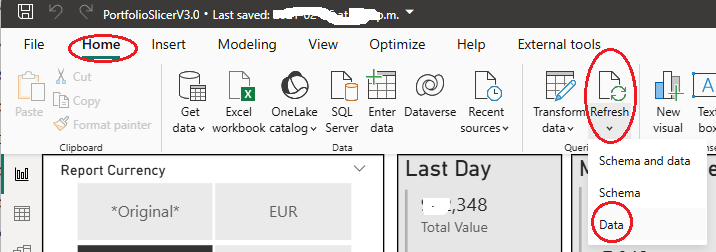
PortfolioSlicer.pbixinPower BI Desktop. - On the
Homeribbon, clickRefreshand chooseData. - Wait for the refresh to finish.
- Review the report pages that you use most often.
Important Notes
- Before refreshing Power BI, make sure you already updated the files for Portfolio Slicer reports.
- If you changed the location of your Excel source file or external data files, first update the Power BI connections.
- Power BI usually refreshes faster than the Excel report files, but actual speed depends on your portfolio size and computer performance.