PowerShell script to append generated quotes to Quotes.csv file
Overview
AppendGeneratedQuotes.ps1 appends generated quote records to Quotes.csv.
This is useful for symbols whose value should be treated as fixed or manually defined rather than downloaded from a quote provider.
Typical examples include:
- guaranteed investment products
- instruments that should carry a fixed price
- special symbols where no external quote source is used
Where the Script Gets Its Data
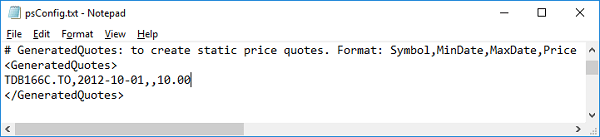
The script reads generated quote definitions from the GeneratedQuotes section in psConfig.txt.
A typical entry looks like this:
<GeneratedQuotes>
VidasGIC20170325,2014-03-25,,5000.00
TDB166C.TO,,,10.00
</GeneratedQuotes>
In this format:
Symbolis requiredMinDateis optionalMaxDateis optionalPriceis required
If MinDate is blank, the script uses the global MinDate from psConfig.txt.
If MaxDate is blank, the script uses the current date.
What the Script Produces
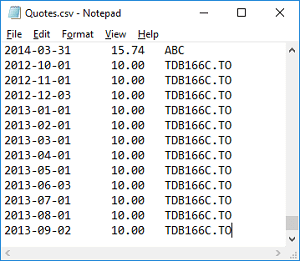
The script creates generated quote rows for the configured date range and appends them to Quotes.csv.
The generated output can be used together with normal quote data.
Important Caution
This script appends to the existing file.
That means it should normally be used only in a workflow where Quotes.csv has already been rebuilt cleanly before generated rows are added.
Otherwise, duplicate records may be introduced.
Practical Advice
- use generated quotes only for symbols that should not come from your normal quote source
- keep symbol names consistent with the
Symboltable in Excel - verify the final
Quotes.csvfile after appending generated quotes