Refreshing Portfolio Slicer Excel data
Overview
Portfolio Slicer Excel workbook contains Power Pivot model that is configured to read files used for Portfolio Slicer reports.
To start this process, first click on menu “Data”, then select button “Refresh All” and then choose “Refresh All”.
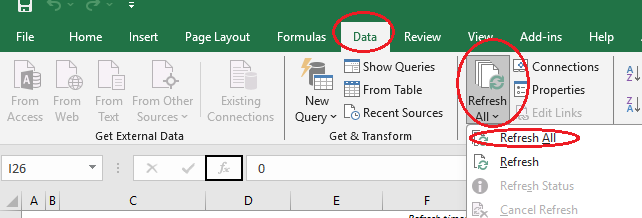
What happens during model refresh
During Power Pivot model refresh, data from files is loaded into the model and right after that ALL reports in all worksheets are recalculated.
This report recalculation can take 1-2 minutes, or sometimes even more.
Important
Before refresh check folder c:\PortfolioSlicer\PSData\ for file error.txt. If the file is not there, then no problems were found during file preparation.
If the error.txt file is in that location, you need to read its content and fix the errors reported. Do not refresh your model data when you have issues with files.