Symbol Sector Table
Overview
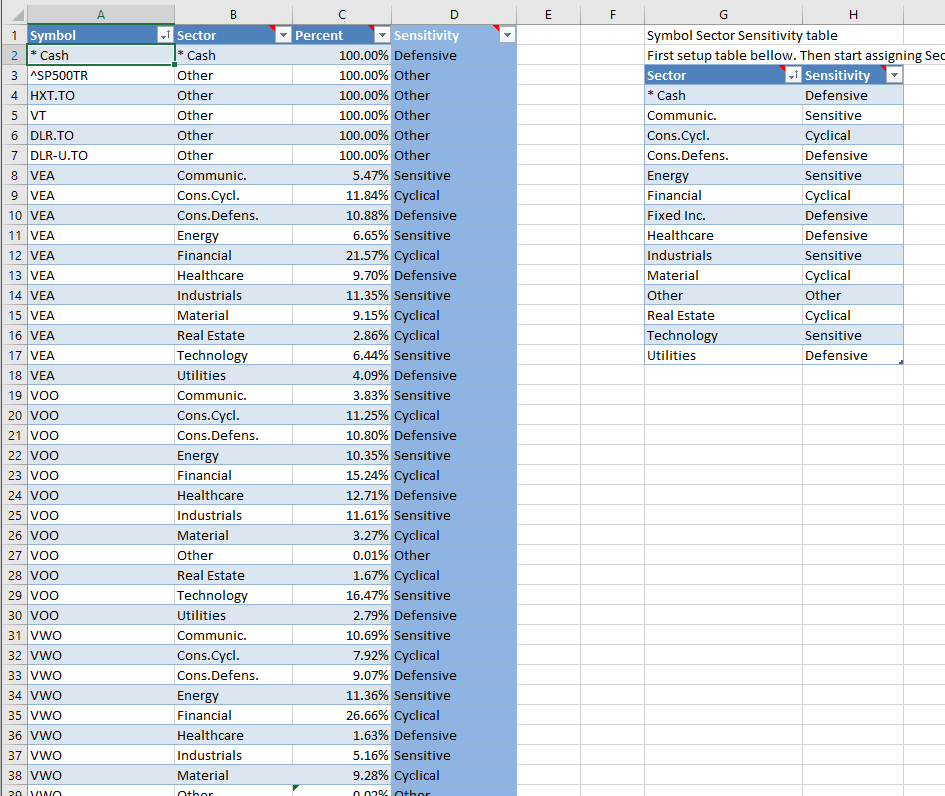
The Symbol Sector table lets you assign sector and sensitivity-style metadata to symbols.
This table is optional. Many users leave it empty at first and fill it in later when they want more detailed sector-based reporting.
This table is part of PortfolioSlicer-Source.xlsx and is used to enrich symbol-level analysis beyond simple holdings and performance reporting.
How It Is Used
This table can support:
- sector-based grouping
- sensitivity or defensive/cyclical categorization
- more detailed analysis beyond simple symbol-level reporting
Some symbols may map fully to one sector, while others may be split across multiple sector rows.
Where This Table Is Used
The Symbol Sector table is used together with the Symbol table to assign sector and sensitivity information to each investment.
For each symbol you can assign both Sector and Sensitivity. When you first start using Portfolio Slicer, you can leave this table empty and then add data later when you want to see more detailed reports.
Standard Sector and Sensitivity List
A practical default set of sectors and sensitivities is:
| Sector | Sensitivity |
|---|---|
* Cash |
Other |
Communic. |
Sensitive |
Consumer Cycl. |
Cyclical |
Consumer Defens. |
Defensive |
Energy |
Sensitive |
Financial |
Cyclical |
Fixed Inc. |
Fixed Inc. |
Healthcare |
Defensive |
Industrials |
Sensitive |
Material |
Cyclical |
Other |
Other |
Real Estate |
Cyclical |
Technology |
Sensitive |
Utilities |
Defensive |
You do not have to use exactly this list, but using a consistent set of values makes the reports easier to review and compare.
Single-Sector and Split-Sector Examples
Some symbols can be assigned to only one sector. For example, symbol C could be assigned to sector Financial with Percent = 100% and Sensitivity = Cyclical.
Other symbols may need split sector allocation. For example, symbol IYR could have two records such as:
Material-5%,Sensitivity = CyclicalReal Estate-95%,Sensitivity = Cyclical
This makes the table useful when one ETF or fund represents more than one sector exposure.
Where To Get The Information
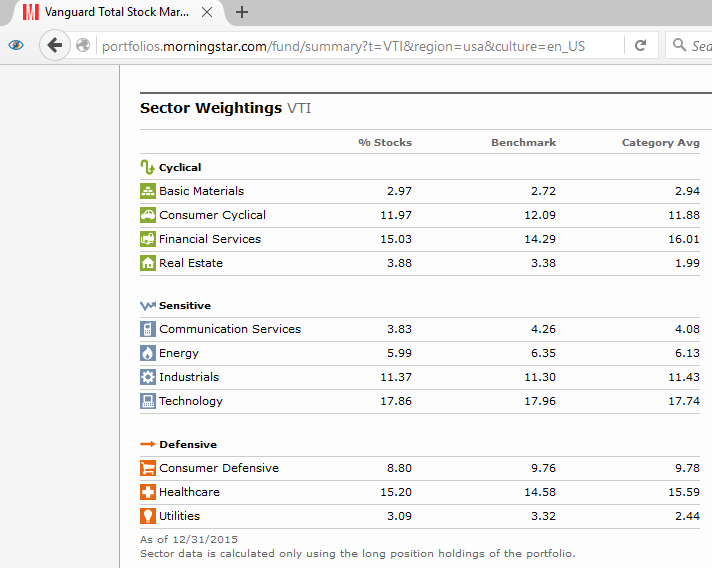
You can get sector and sensitivity information for a specific symbol from financial websites such as Morningstar and similar research sites.
Why You Might Leave It Empty at First
Portfolio Slicer can work perfectly well without this table during initial setup.
That makes it a good table to postpone until after your first successful refresh.
Practical Advice
- it is fine to leave this table empty during initial setup
- add data only when it supports a reporting need you actually care about
- keep sector naming consistent if you use multiple rows per symbol
- if you use multiple rows for one symbol, review the totals and logic carefully
- if you split one symbol across several rows, make sure the percentages add up correctly