Symbol Alias Table
Overview
The Symbol Alias table helps translate alternate symbol names or labels into the actual symbol codes Portfolio Slicer uses internally.
This table is used just by transactions Table - when you enter SymbolName value, Excel code will check this SymbolAlias table for match, and if found, then Symbol column value will be used for that transaction.
This is especially useful when your broker or statement uses names that differ from the symbol codes in your quote data.
For example, you have a symbol VOO, but your investment broker will labels all transactions for that symbol with S&P 500 ETF.
If you would add a record into SymbolAlias table with SymbolAlias=“S&P 500 ETF” and Symbol=“VOO”, then any transaction for SymbolName=“S&P 500 ETF” will be assigned Symbol VOO.
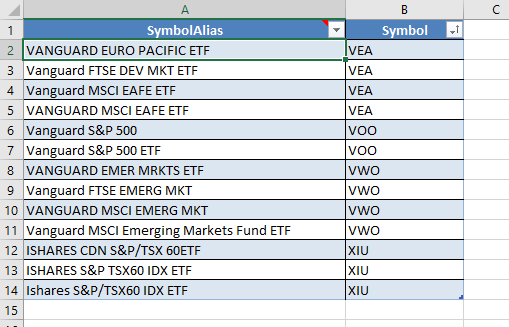
Table columns
SymbolAlias- any alternative name for SymbolSymbol- Symbol value matching entry in symbol Table
When It Helps
Use the Symbol Alias table when:
- statements show names instead of tickers
- the same investment appears under multiple labels
- you want easier manual data entry in the Transactions table
How It Works
In the Transactions table, you enter a SymbolName value.
Portfolio Slicer then tries to resolve it by:
- checking the Symbol Alias table
- falling back to the entered value if no alias mapping is found
Practical Advice
- keep aliases simple and unambiguous
- use them only when they actually reduce data-entry friction
- confirm that alias resolution still leads to the symbol code used in quotes and symbol definitions
- if symbol names are already consistent everywhere, you may not need this table at all