Config Table
Overview
The Config table is the first tables you should edit when setting up Portfolio Slicer.
It controls a small number of important workbook settings that affect how Portfolio Slicer behaves.
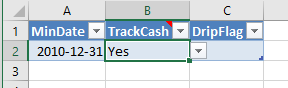
Table Columns
MinDate- Defines the date from which you want to start tracking portfolio history.
Important:MinDatevalue in this Config table should be exactly the same as the<MinDate>parameter value inPSDataExtrct\Scripts\psConfig.txtused by the External Data Management Scripts.TrackCash- Yes/No value that specifies if Portfolio Slicer will track cash. For more detail, see Tracking Cash in Portfolio Slicer.DripFlag- Not used, for backward compatibility.
Choosing a Good MinDate
A useful MinDate is one that gives you enough historical context without forcing you to enter more data than you are realistically willing to maintain.
A common practical approach is:
- choose a starting point several years in the past
- use a year-end or business-year-end style cutoff when possible
- make sure your opening transactions establish holdings cleanly from that date forward