Allocation Table
Overview
The Allocation table stores the target allocation categories used for allocation-related reports.
These allocations can represent regions, markets, sectors, asset classes, or any other grouping you want to use for target-versus-actual comparisons.
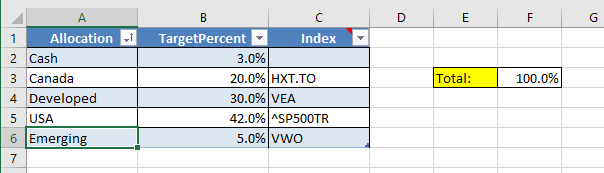
Table Columns
Allocation- short name identifying allocation, for example ‘Cash’, ‘Canada’, ‘USA’, ‘Emerging’TargetPercent- numeric percent value that specifies target allocation percent. Important - sum of TargetPercent must be equal to 100%.Index- Symbol, that closely matches that Allocation performance. For example, for “USA” allocation you can specify Symbol “^SP500TR” as that symbol performance can be representative of USA market.
Important - any value used here should also be in the Symbol table and your scripts should be setup to receive quotes for that Symbol.
How It Works
Each symbol can be assigned to an allocation value (one or more), and the Allocation table defines the target percentages for those categories.
For example, you might target your portfolio to be 70% USA and 30% Canadian. Portfolio Slicer can then compare your target allocation vs your actual allocation.
If the symbol is assigned to one allocation, then this is done in Symbol table. If the symbol is split by multiple allocations, then this should be done in SymbolAllocation table
Important Rule
The target percentages should add up to 100.
If they do not, allocation-related reporting may not behave as expected.
Common Uses
Users often use allocations for:
- country or region targets
- broad asset allocation targets
- portfolio rebalancing review
- custom strategy buckets
Practical Advice
- keep the categories simple at first
- make sure symbol allocation values match this table exactly
- review total target percentages after editing
- do not add unnecessary allocation complexity before your first successful refresh